# Free Google Maps Rank Checker: See Your Rank on a Map
URL: https://www.getrankonmap.com/blog/free-google-maps-rank-checker
Published: 2026-07-07
## What Free Actually Gets You
* **A Google Maps rank checker tells you where your business shows up in the Map Pack** for a given search — but the useful question isn't "what's my rank?", it's "where am I winning and where am I invisible?"
* **A single-point rank checker quietly lies to you** — because Maps ranking [changes from one location to the next](https://getrankonmap.com/blog/why-google-maps-ranking-varies-by-location), a checker that hands you one number is reporting a single spot on a map and calling it the whole picture
* **You can check your Google Maps ranking for free today** — but the manual methods all have caveats (Google personalises results by your location and history), so a free check is a rough read, not a clean measurement
* **Google ranks local businesses on three factors** — [relevance, distance, and prominence](https://support.google.com/business/answer/7091?hl=en) — and the distance factor is exactly why one rank number can't represent your visibility across an area
* **The honest free checker isn't a number — it's a map** — a [GeoGrid](https://getrankonmap.com/blog/what-is-geogrid-rank-tracking) checks your rank at many points across your catchment and draws the result as a green-to-red heatmap, so you see coverage, not a single misleading figure
* **RankMap is building a free GeoGrid rank checker** — it isn't live yet, so this page is an honest invitation rather than a tool you can run today; **[join the waitlist](https://getrankonmap.com/waitlist)** for free early access
If you searched for a free Google Maps rank checker, you already know what you want: to type in your business and a keyword and find out where you actually show up. That's a fair thing to want, and the short answer is that yes, you can check it for free. The longer, more useful answer is that *how* you check it decides whether the number you get back means anything at all — because most rank checkers answer the wrong question. This page is about what a rank checker really does, the free ways to check today and their honest limits, and what a free checker should show you instead of a single number that flatters or scares you for no reason.
## What a Google Maps Rank Checker Actually Does
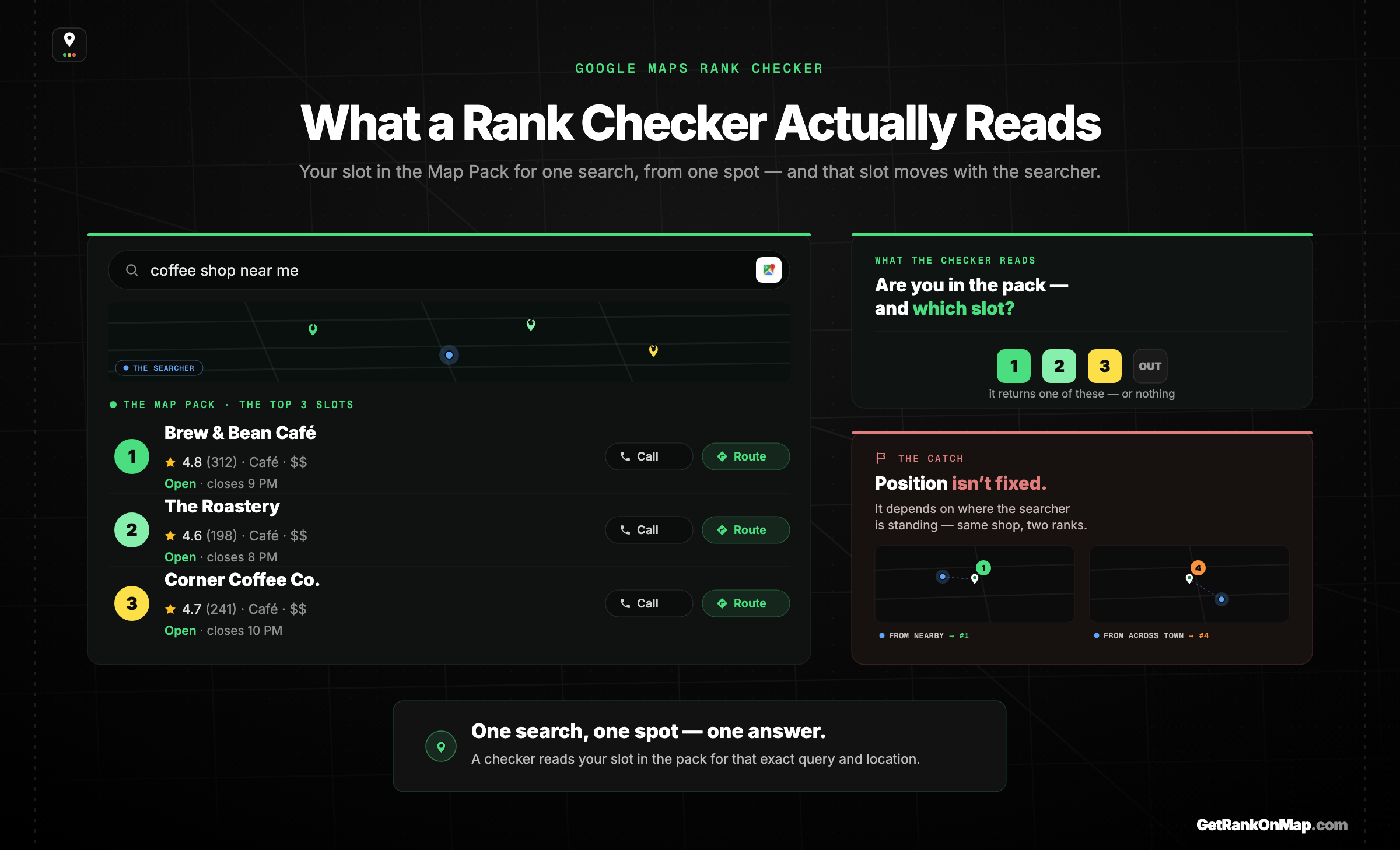
What a rank checker reads: your slot in the Map Pack for a given search.
> A Maps rank checker reports where your business appears in the local results for a search — your position in the Map Pack, the three-business box at the top of a local query. That's genuinely useful information. The catch is that "your position" isn't one fact: it depends entirely on where the searcher is standing when they look.
When you search for something local — "plumber near me," "coffee shop [town]," "dentist open now" — Google shows a **Map Pack**: a small map with three businesses, their ratings, hours, and tap-to-call or directions buttons. A rank checker's job is to tell you whether your business is in that pack for a given search, and if so, where: first, second, third, or somewhere down the longer list if you tap through.
That's worth knowing. If you're invisible in the pack for the searches that matter to your business, you're losing customers at the exact moment they're choosing — and a checker is how you find out. So far, so good.
The problem is the shape of the answer. Most free checkers give you a single number — "you're #4 for 'plumber near me'" — as if that were a fixed fact about your business. It isn't. Google decides your rank partly on how close you are to the person searching, so the same search returns a different result depending on where that person is. A checker that reports one number has quietly picked one spot, run the search from there, and presented the result as the whole truth. It isn't lying on purpose; it's just answering a smaller question than the one you actually have.
## Why a Single-Point Rank Checker Lies to You
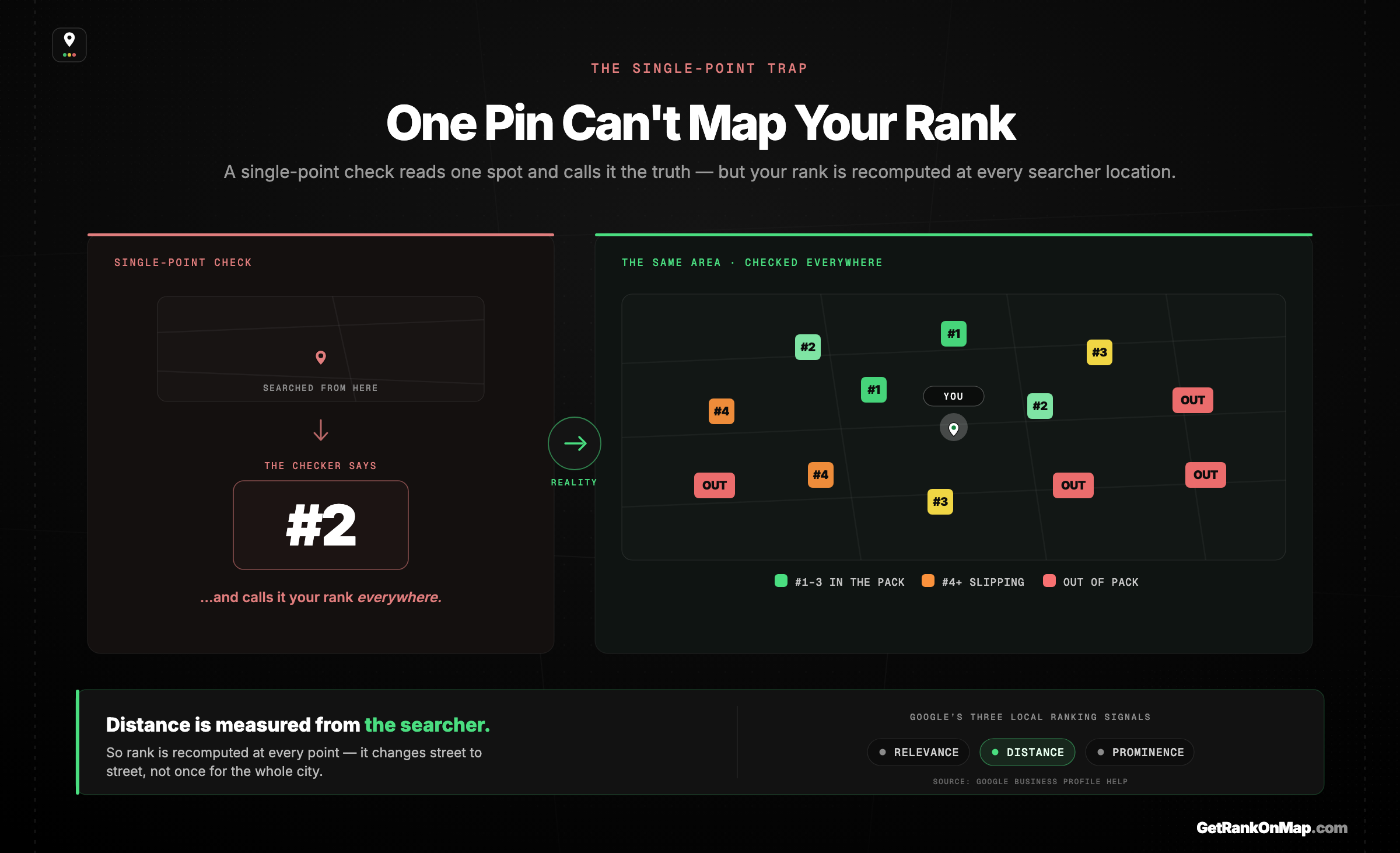
One point, one number — but your real rank changes across the whole area.
> Google ranks local results on relevance, distance, and prominence — and distance is measured from the searcher. So your rank is recalculated for every location. A checker that returns one number has measured one point and ignored that your visibility is different a few streets away. The single number is the most common, and most misleading, way to "check" your Maps rank.
Google is open about how local ranking works: it weighs **relevance** (how well your profile matches the search), **distance** (how close you are to the searcher), and **prominence** (how established and well-reviewed you are). Because distance is measured from wherever the searcher happens to be, your ranking isn't a single value — it's a different answer in every part of the area you draw customers from.
That's the flaw baked into a single-point checker. It runs the search from one location — often somewhere generic, not even your customers' neighbourhoods — and reports that result as your rank. You might be told you're #2 and feel fine, while a few streets away, where a chunk of your customers actually search from, you've dropped out of the pack entirely and a competitor is taking that business. Or the reverse: a checker scares you with a #7 measured from across town, when you're #1 everywhere that matters. Either way, [the one rank number is misleading by design](https://getrankonmap.com/blog/one-rank-number-lies) — not because the tool is broken, but because it's [reporting a map as if it were a point](https://getrankonmap.com/blog/why-google-maps-ranking-varies-by-location).
This is the gap most rank-checking falls into: [a single number can't represent visibility that varies across space](https://getrankonmap.com/blog/map-pack-tracking-gap). If you only ever check your rank from one spot — including the "free" check most tools and even your own searches give you — you're not measuring your Maps presence. You're sampling one pixel of it.
## How to Check Your Google Maps Ranking for Free, Today
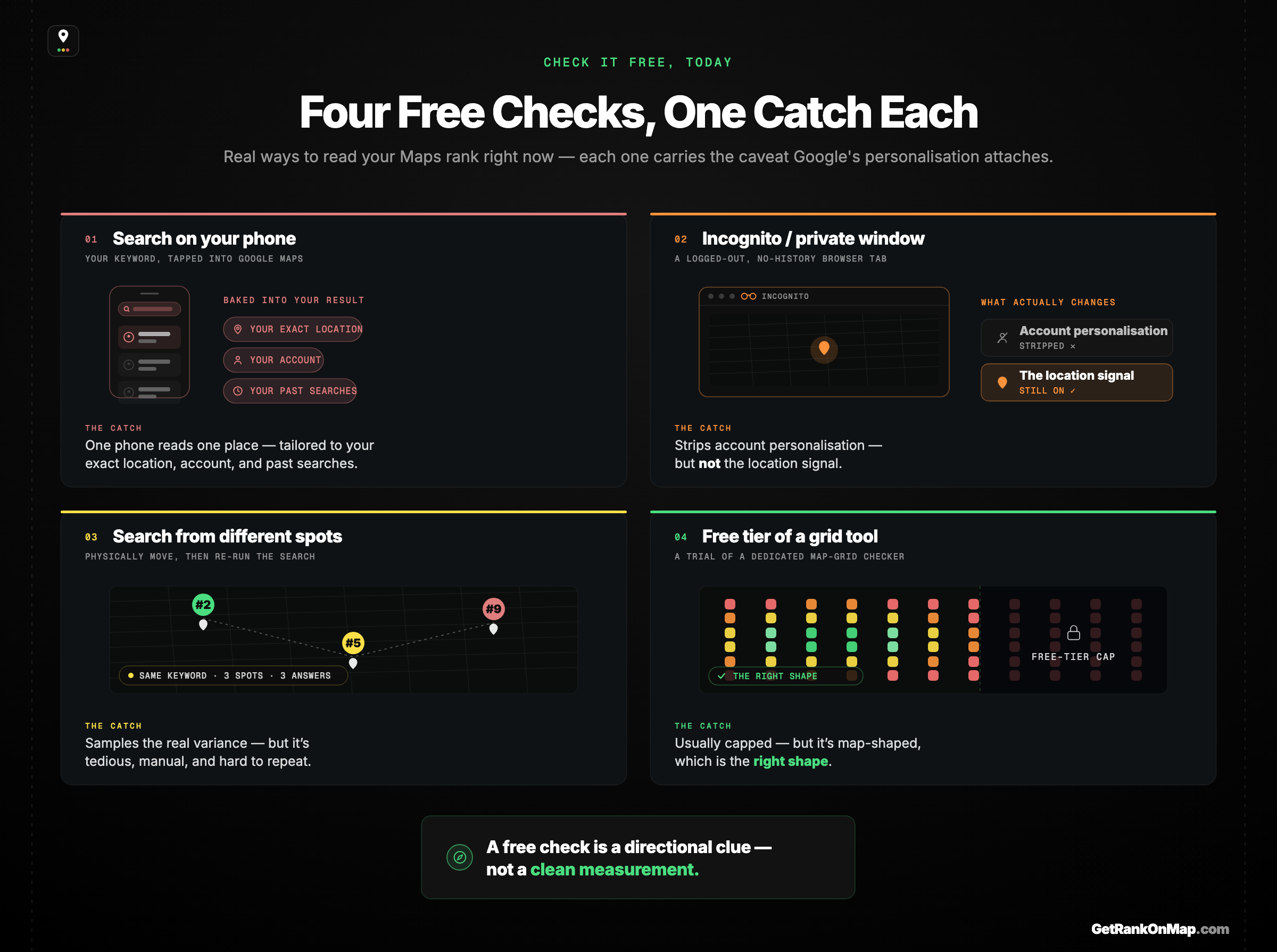
Four free ways to check your rank today — and the catch on each.
> You don't have to wait for a tool to get a rough read. There are free ways to check your Maps rank right now — but each comes with a caveat, because Google personalises results by your location, your account, and your history. Treat a free manual check as a directional clue, not a clean measurement.
Here are the honest free options, with what each one actually tells you:
* **Just search for your keyword on your phone.** The simplest check: search "[your service] near me" where you are and see if you're in the pack. The caveat is big — Google tailors the result to your exact location, your logged-in account, and your past searches, so what *you* see is not what a customer across town sees. It's a clue, not a verdict.
* **Search in an incognito or private window.** Going incognito strips out some personalisation from your account and history. It does **not** remove the location signal — Google still ranks by where your device is — so you're still only seeing your rank from one spot: wherever you happen to be sitting.
* **Check from different physical locations.** If you genuinely want to know how you rank across your area for free, you can search from different parts of it — at a customer's neighbourhood, the next suburb over, the edge of your catchment. This is the closest a manual free check gets to the truth, because it samples the variance. It's also tedious, easy to do inconsistently, and impossible to repeat reliably week after week.
* **Free trials and free tiers of dedicated tools.** Some grid-based [rank tracker](/blog/best-local-rank-trackers-2026)s offer a limited free check or trial. These can show you the map-shaped picture rather than a single number — which is the right shape — but free tiers are usually capped, and the honest ones tell you so. ([Here's how the dedicated tools compare.](https://getrankonmap.com/blog/best-local-rank-trackers-2026))
The pattern across all of these: a free check is real and worth doing, but every manual method gives you one vantage point at a time, and Google's personalisation makes even that one point fuzzy. To actually *check* your ranking — across your area, consistently, in a way you can compare next month — you need to measure many points at once and draw the result as a map.
## What a Free Checker Should Actually Show: A Map, Not a Number
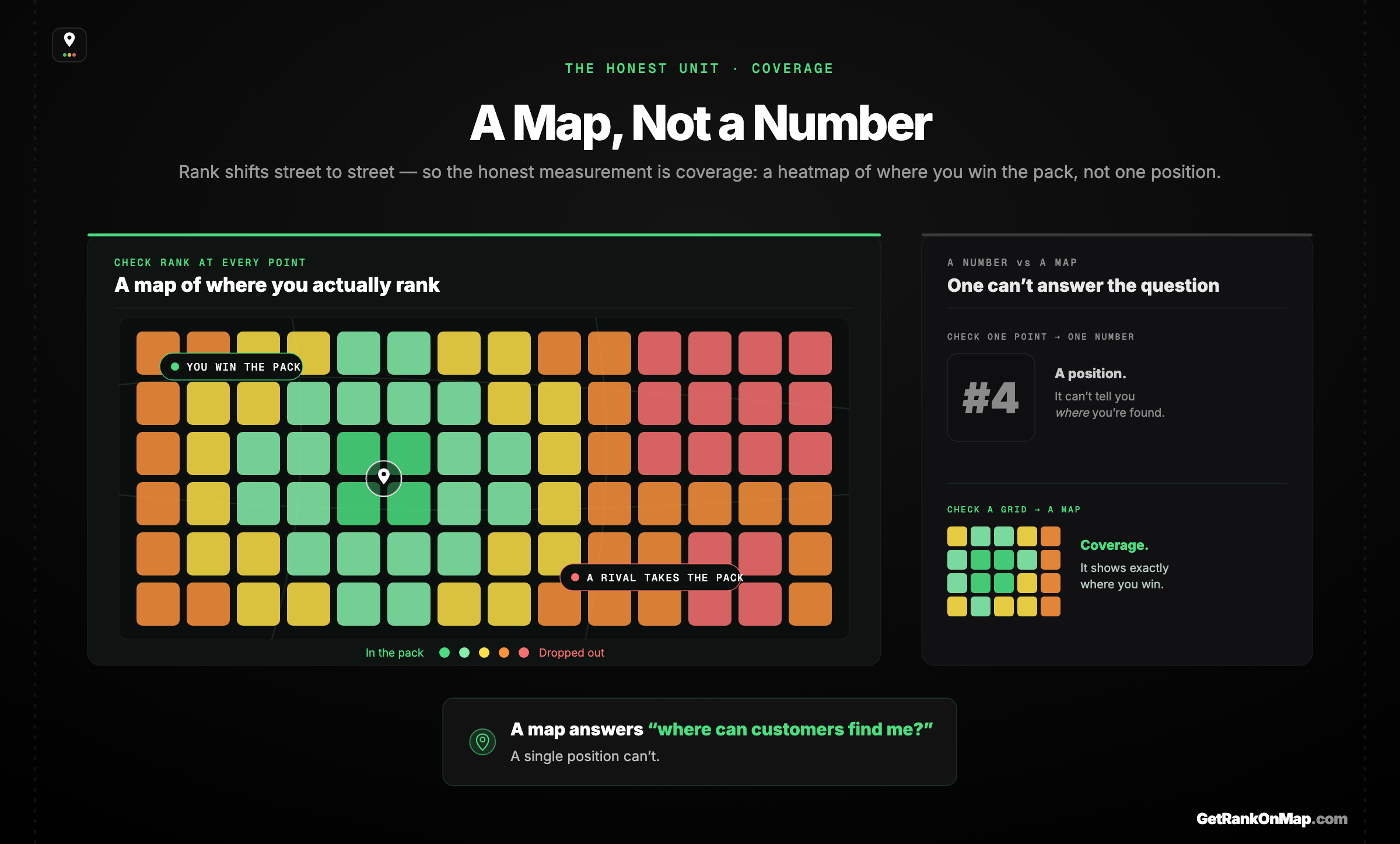
The honest unit isn't a position — it's coverage, drawn as a heatmap.
> Because Maps ranking varies across space, the honest unit of measurement isn't a position — it's coverage. A GeoGrid checker lays a grid of points across your catchment, checks your rank at each, and colours the result green where you're winning and red where you're not. That map is what "checking your rank" should mean.
If your real rank is different at every location, then the right way to check it is to check it *at* many locations — and that's exactly what a **GeoGrid** does. It lays a grid of points across the area you care about, runs your search at each point, and draws the results as a colour-coded heatmap: green where you're in the pack, fading through yellow, to red where you've dropped out. [Here's how a GeoGrid scan works.](https://getrankonmap.com/blog/what-is-geogrid-rank-tracking)
That map answers the question you actually have. Not "what's my number?" — which is meaningless on its own — but "where can customers find me, and where am I invisible?" You can see the neighbourhoods where you own the pack, the ones where a competitor has quietly taken it, and exactly how far your visibility reaches before it fades. A single-point checker can't show you any of that; it was never built to. For a local business, the map is the honest read and the number is the comforting illusion.
So when you go looking for a free Google Maps rank checker, the thing worth wanting isn't a free number — it's a free *map*. A number tells you almost nothing and sometimes the wrong thing. A heatmap tells you where your customers can find you. That's the standard a checker should be held to, free or paid.
## The Free Google Maps Rank Checker We're Building
That map is exactly what **RankMap** is built to give you: your Map Pack visibility checked across a grid of points and drawn as a green-to-red heatmap, so "checking your rank" means seeing your real coverage, not a single misleading figure. And it's built around a real free tier — track your own business, run a check, and see the map before you ever pay or hand over a card.
The honest part: **RankMap isn't live yet — we're pre-launch.** So this isn't a tool you can run this minute, and we're not going to pretend otherwise. What this page is, instead, is an open invitation. If a free, map-shaped rank checker — one that shows you where you actually stand across your area instead of one flattering or frightening number — is what you came here for, **[join the waitlist](https://getrankonmap.com/waitlist)** for free early access. You'll be first in the day it opens, and you'll have a say in how the free tier works.
## Free Should Still Mean Honest
Checking your Google Maps ranking for free is worth doing — but only if you check the right thing. A single number, whether from a free tool or your own phone, samples one spot and presents it as the whole truth, when your real visibility is different in every part of the area you serve. That's not a quirk to work around; it's [the distance factor working as designed](https://support.google.com/business/answer/7091?hl=en), and it's why the honest version of a rank check is a map, not a figure.
The standard to hold any checker to — free or paid — is whether it shows you coverage: where customers can find you, and where a competitor has quietly taken the pack. That's the free checker **RankMap** is built to be, a green-to-red heatmap of your real Map Pack visibility with a genuine free tier behind it. We're not live yet, and we won't pretend we are — but when we open, you'll get to check your rank the way it should have been checked all along. **[Join the waitlist](https://getrankonmap.com/waitlist)** for free early access.
**Start here:** [Local SEO Ranking Tools: The Six Jobs a Stack Has to Cover](https://getrankonmap.com/blog/best-local-seo-tools) — the full guide this page sits under.