Local SEO for Service-Area Businesses on Google Maps
No storefront, just a service radius? How service-area businesses rank on Google Maps, why ranking fades across your area, and how to track the whole radius.

Serving an Area, Ranking From a Point
-
Service-area businesses (SABs) have no storefront customers visit — plumbers, electricians, cleaners, mobile tutors, locksmiths — yet they still compete in the Google Map Pack, and it's often their biggest source of jobs
-
Google still ranks you from a point, even when you serve a radius — distance is measured from your location to the searcher, so your Map Pack visibility is strongest near your base and fades across the area you claim to cover
-
Hiding your address doesn't change the distance maths — SABs can hide their address on their Business Profile, but Google still uses your location to calculate distance; the radius you list isn't a ranking shield
-
The factors you control are relevance and prominence — accurate categories, service descriptions, consistent business data, and genuine reviews — because distance is the one lever you can't move
-
Your real question is coverage: not "do I rank?" but "do I rank across the whole area I tell customers I serve?" — and a single position can't answer that
-
For an SAB, the heatmap is the honest scoreboard — it shows the parts of your service area where you're winning the pack and the parts where you're invisible to the people you'd happily drive to
A service-area business makes a promise: we come to you, across this whole area. But Google doesn't take that promise at face value when it decides who to show in the Map Pack. It ranks you from where you actually are, and your visibility quietly thins out the further a job is from your base. So the area you serve and the area you're visible in are rarely the same shape — and most service-area businesses have never seen the gap between them. This piece is about how SABs really rank on Google Maps, why your coverage isn't what you think, and how to actually measure it.
You Serve an Area, But Google Ranks You From a Point

A service-area business covers a radius, but Google's distance factor is calculated from your business location to each searcher. So even though you'd happily take a job across town, your Map Pack visibility is strongest near your base and weakens with distance — the same way it does for a shopfront. The radius is your promise; the point is Google's maths.
Google ranks local results on three factors — relevance, distance, and prominence — and for a service-area business, distance is the awkward one. You think in terms of the area you cover: "we serve the whole city and thirty minutes around it." Google thinks in terms of a single location and how far each searcher is from it.
That mismatch is the whole story. When someone searches "emergency electrician near me" from the far side of your service area, Google measures the distance from your location to them — and a competitor based closer to that searcher has the distance advantage, even if you're just as willing and able to take the job. The result is the same fade a shopfront sees: strong in the pack near your base, slipping out of it as searches move toward the edges of your radius.
So your service area and your visibility area are two different shapes. You've drawn a generous circle on your website. Google has drawn a smaller, lopsided blob around your actual location. The work of local SEO for an SAB is closing the gap between the two as much as the factors allow — and, first, being able to see it at all.
Hiding Your Address Doesn't Change the Distance Maths
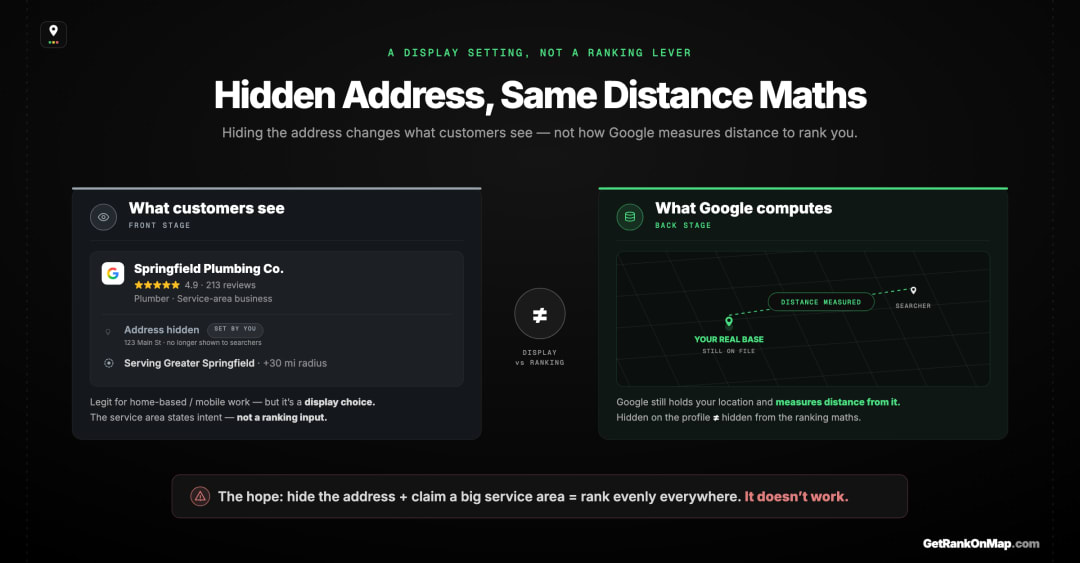
Service-area businesses can hide their street address on their Business Profile — sensible when you work from home and don't take visitors. But hiding the address is a display choice, not a ranking one. Google still knows your location and still uses it to calculate distance. The hidden address doesn't widen your reach; it just stops customers seeing where you're based.
There's a common hope among SABs that goes like this: if I hide my address and list a big service area, Google will treat me as serving everywhere equally. It doesn't work that way. Hiding your address on your Google Business Profile is a legitimate, often recommended setting for businesses that work from home or don't receive customers — but it changes what the public sees, not how Google ranks you.
Behind the scenes, Google still has your location, and distance is still measured from it. Listing a service area that spans a whole county doesn't make you rank evenly across that county; it tells Google and customers where you're willing to work, while the distance factor quietly keeps doing its job from your real base. The radius you enter is a statement of intent, not a ranking input that flattens the map.
This matters because it kills a tempting shortcut. There's no profile setting that makes the distance fade disappear. The only honest levers are the other two factors — and the only honest way to know where you stand is to look.
The Factors You Can Actually Move

You can't change how far you are from a searcher, so distance is fixed. That leaves relevance and prominence as the levers an SAB controls — the right categories and services, accurate and consistent business data, and a genuine review profile. These won't beat physics at the far edge of your area, but they decide whether you win the contests you're close enough to be in.
Since distance is off the table — you are where you are — the work concentrates on the two factors you can influence.
Relevance is about matching the search. For an SAB that means choosing the right primary category, listing your actual services clearly, and making sure your profile reads as obviously the-thing-being-searched-for. A "plumber" who's buried their core service under vague descriptions hands relevance away.
Prominence is your reputation and how established you look — and reviews are a big, visible part of it. For service businesses, where customers are wary and word-of-mouth is everything, a steady stream of genuine reviews does real ranking work, the same way it does the trust work.
What these factors do is win you the contests you're physically in the running for — the searches close enough to your base that distance hasn't already ruled you out. They won't make you rank at the far edge of a generous service radius where a closer competitor owns the distance signal. Knowing the difference — where you can compete versus where the map is simply against you — is the strategy. And that requires seeing the map.
Your Real Question: Coverage, Not Position

For a service-area business, "what's my ranking?" is the wrong question, because your ranking has a different value at every point in your area. The right question is coverage: across the whole region you tell customers you serve, where do you actually appear in the pack, and where are you invisible? That's not a number. It's a map.
This is where SABs are most poorly served by ordinary rank checking. A single tracked position — "we're third for electrician" — is a snapshot from one spot, and your real ranking is a different value everywhere else across the area you cover. Map Pack ranking varies by location by design, and for a business whose entire promise is "we cover this area," that variance isn't a footnote — it's the main fact.
The question that actually matters is one of coverage. Across the whole region on your website, the region you tell customers you serve, where do you genuinely show up in the Map Pack, and where does your visibility run out? That gap — between the area you advertise and the area you're findable in — is where an SAB is losing jobs it never hears about, to competitors who simply sit closer to that corner of the map.
You cannot see that gap from a position. You can only see it from a picture of the whole area at once.
How to See Your Coverage: the Heatmap
So how does a service-area business actually measure this? With a GeoGrid: a grid of points spread across your service area, your Map Pack rank checked at each one, and the result drawn as a colour-coded heatmap — green where you're in the pack, red where you've dropped out. Here's how a GeoGrid scan works. For an SAB, that map is the strategy document. It shows the core where you're strong, the edges where distance beats you, and the specific neighbourhoods where you should be winning and aren't. It turns the vague promise of "we serve this whole area" into an honest picture of where customers can actually find you — the surface where local jobs are won or lost.
That's exactly what RankMap is built for: showing a service-area business its true coverage across the whole region it serves, not a single borrowed position. RankMap isn't live yet — we're pre-launch. Join the waitlist for early access and be first in line the day the map is ready.
No Storefront, Still a Centre
The same playbook adapts by industry — for example, ranking a healthcare business on Google Maps.
A service-area business lives or dies by a promise — we come to you, across this whole area — but Google ranks you from a single point and lets your visibility fade with distance. So the area you advertise and the area you're actually findable in are different shapes, and the gap between them is where the lost jobs hide. Hiding your address won't widen your reach, and a single rank check won't reveal the gap; only a picture of the whole area can.
That's the gap RankMap is built to close — showing a service-area business its true Map Pack coverage across every corner of the region it serves, instead of one flattering number from one spot. We're not live yet, but when we are, you'll finally see the difference between the area you serve and the area you're seen in. Join the waitlist to be first in line.
Start here: Local SEO for Multiple Locations: Every Branch Ranks Alone — the full guide this page sits under.
Frequently asked questions
- 01Can a business with no storefront rank on Google Maps?
- Yes. Service-area businesses — plumbers, electricians, cleaners, mobile tutors and the like — can have a Google Business Profile and compete in the Map Pack even without a location customers visit. You can hide your address while still listing the area you serve. What you can't do is escape the distance factor: Google still ranks you from your actual location, so your visibility is strongest nearby and fades toward the edges of your service area.
- 02Does hiding my address hurt or help my ranking?
- Hiding your address is mainly a display choice, not a ranking lever. It's the right setting for home-based or mobile businesses that don't receive customers, and it doesn't penalise you — but it also doesn't help you rank more evenly across your area. Google still knows your location and still uses it to calculate distance, so the hidden address changes what customers see, not how the distance factor works.
- 03Why don't I rank across my whole service area?
- Because Google measures distance from your location to each searcher, your Map Pack visibility naturally weakens the further a search is from your base, while competitors closer to that spot gain the distance advantage. The service area you list is a statement of where you'll work, not a setting that makes you rank evenly everywhere. The honest picture is a coverage map showing where across your area you actually appear in the pack.
- 04What can I actually do to rank better as a service-area business?
- Focus on the two factors you control: relevance and prominence. Choose the correct primary category, describe your services clearly, keep your business name, phone and details consistent everywhere, and earn genuine reviews steadily. You can't change your distance from any given searcher, so these levers win you the searches you're close enough to compete for — and a coverage map tells you where that is and where the map is simply against you.
- 05How should I track my ranking if I serve a wide area?
- Track coverage, not a single position. Because your Map Pack ranking has a different value at every point in your service area, one tracked rank can't represent it. A GeoGrid checks your rank across a grid of points spanning your area and shows the result as a heatmap, so you can see the parts of your region where you're winning the pack and the parts where you're invisible — which is exactly where a service-area business is quietly losing jobs.
Explore with AI
Share this
Map your real rank across the city.
Free for the first 50 scans. No credit card.
Join the waitlist