Google Business Profile Optimization Checklist
A practical Google Business Profile checklist — verify, complete every field, and win reviews and photos — grouped by how Google actually ranks you.
The Checklist, in Brief
-
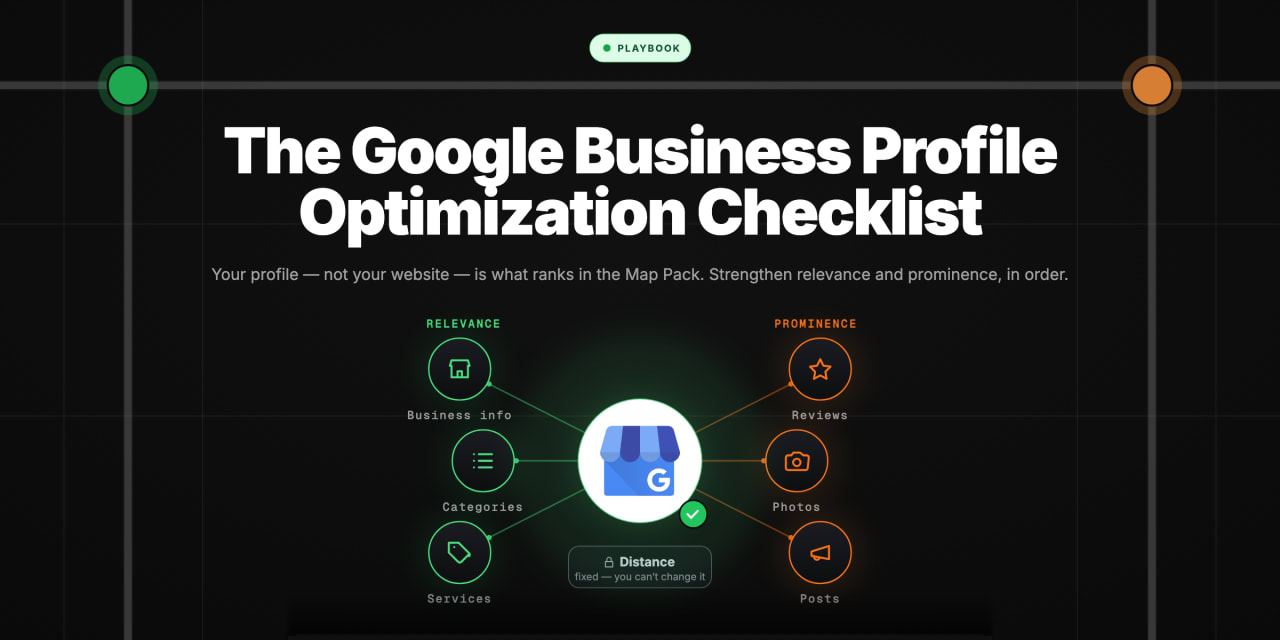
Your Google Business Profile is what ranks in the Map Pack, not your website — so optimising it is the single highest-leverage thing most local businesses can do for local search
-
Google ranks local businesses on three factors — relevance, distance, and prominence — and a good checklist is really just "strengthen relevance and prominence, since distance you can't change"
-
The foundations gate everything — an unverified, incomplete, or inconsistent profile can't rank no matter what else you do, so they come first
-
Reviews and photos do real ranking work — they feed prominence and they persuade the human who's choosing, so they earn a permanent place on the list
-
Optimisation is ongoing, not a one-off — a profile that's completed once and abandoned slowly loses ground to competitors who keep theirs active
-
The step every checklist skips: measuring whether it worked — because your ranking varies across your area, you can't tell if your optimisation moved the needle by searching from one spot; you need to see it as a map
There are a hundred Google Business Profile checklists online, and most of them are the same flat list of fields to fill in. This one is organised around why each thing matters — because once you know that Google ranks you on relevance, distance, and prominence, the whole checklist stops being a chore and becomes obvious: you're strengthening the two signals you can control and getting out of your own way on the one you can't. We'll go foundations first, then the relevance work, then the prominence work, then the part almost everyone forgets — checking whether any of it actually changed where you show up.
Start With the Foundations

Before any clever optimisation, the profile has to be in good standing: claimed, verified, free of duplicates, and accurate. None of the ranking work below counts for anything if the foundations are broken — an unverified or duplicated profile can't compete no matter how well you fill it in.
These are the non-negotiables. Get them wrong and nothing else on this list matters.
-
Claim and verify the profile. An unverified Google Business Profile generally won't show in Maps. Claim your business and complete Google's verification — this is the gate to everything else.
-
Kill duplicate listings. If more than one profile exists for your business, Google may split your signals or show the wrong one. Find duplicates, and merge or remove them so there's a single, correct, verified profile.
-
Get your name, address, and phone number exactly right — and consistent everywhere. Your NAP details should match across your website, directories, and social profiles. Inconsistency weakens the relevance signal and confuses both Google and customers. Use the real business name; don't stuff keywords into it (that breaks Google's guidelines and risks suspension).
-
Set accurate hours, including special hours. Wrong hours are one of the fastest ways to lose trust — and Google surfaces "open now" prominently. Keep holiday and special hours current.
Foundations done, you can actually start optimising. Everything from here strengthens one of the two ranking factors you have control over.
Strengthen Relevance: Categories, Services, and Description
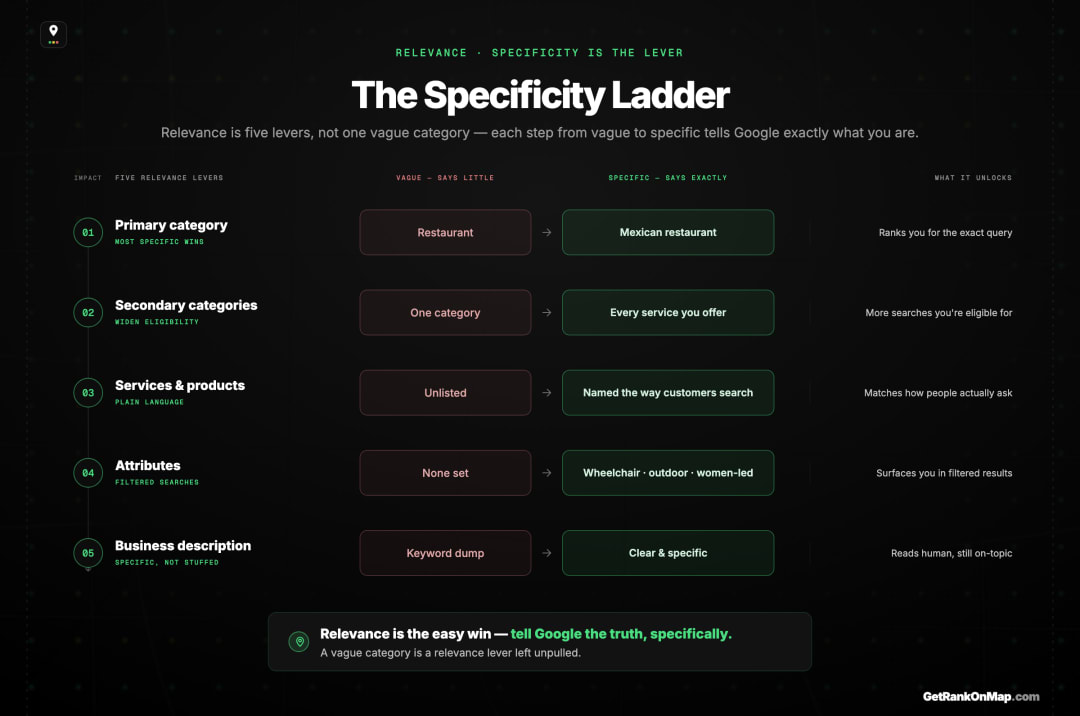
Relevance is how well your profile matches what someone searched. You strengthen it by telling Google precisely what you are and what you do — through your primary category, secondary categories, services or products, attributes, and description. This is the most under-used lever, because most profiles pick one vague category and stop.
Relevance is where the easy wins live, because so few businesses do it properly.
-
Choose the most specific primary category you can. "Mexican restaurant" beats "restaurant"; "emergency plumber" beats "plumber." The primary category does heavy lifting in matching you to searches, so pick the one that describes your core business most precisely.
-
Add the secondary categories you genuinely offer — and only those. They widen the range of searches you're eligible for, but Google's own guidance is to use as few as possible, and a broader parent category above your primary adds nothing because Google already includes it. Which secondary categories actually earn their place.
-
Fill in services or products with descriptions. List your actual services or products and describe them in plain language your customers use. This adds relevant terms to your profile honestly — describing what you really do, not keyword-stuffing.
-
Set the relevant attributes. Wheelchair accessible, outdoor seating, free Wi-Fi, women-led, identifies-as — these help you match filtered and specific searches, and they reassure customers.
-
Write a genuine business description. Use it to describe who you are, what you do, and who you serve, naturally. It's not a keyword dumping ground, but it's a chance to be clear and specific. Here's how all of these factors fit together.
The principle throughout: tell Google the truth, specifically. Vagueness is the enemy of relevance.
Build Prominence: Reviews, Photos, and Activity

Prominence is how established and well-regarded Google judges you to be — and reviews are the biggest visible part of it. Combined with strong, current photos and a profile that's kept active, this is the work that both ranks you and persuades the customer. It's slow, it's ongoing, and it's the most rewarded effort on the list.
Prominence can't be filled in once like a form field — it's earned over time. That's exactly why it's worth the effort: it's hard to fake and hard for a competitor to shortcut past you.
-
Earn genuine reviews, steadily. A strong, growing review profile supports your ranking and is often the first thing a customer judges you on. Ask happy customers, make it easy, and keep it consistent rather than in one big burst. Never buy reviews or incentivise fake ones — it breaks Google's policies and corrodes trust.
-
Respond to reviews — all of them. Replying signals an active, engaged business and shows future customers how you handle both praise and problems. It's a visible prominence and trust signal.
-
Add strong, current photos — and keep adding. Real photos of your premises, your work, your team, and your products help customers choose and keep the profile looking active. Refresh them; a profile whose newest photo is three years old looks abandoned.
-
Use Google Posts and keep the profile active. Updates, offers, and posts signal a live business. Activity won't outweigh relevance and distance, but a maintained profile holds ground that a neglected one quietly loses.
-
Answer questions in the Q&A. Populate it with the real questions customers ask — and answer them yourself before someone else gives a wrong answer.
This is the compounding work. It's also why optimisation is never "done."
Optimisation Is Ongoing — and Distance You Can't Change
Two truths keep this list honest. First, a profile decays if abandoned — competitors keep working theirs, so optimisation is maintenance, not a one-time project. Second, of Google's three factors, distance is the one you can't optimise — you can't move your shop — which is why your results will always vary across your area no matter how perfect the profile.
Worth saying plainly so you don't chase the wrong things. Optimisation is maintenance. The profile you perfect today slips if you stop — reviews go stale, photos age, a competitor overtakes you on activity. Treat it as a standing habit, not a project you close.
And distance is the factor you can't touch. Google ranks partly on how close you are to the searcher, and you can't relocate to be near everyone. So even a flawless profile will rank differently from one part of your area to the next — strong near you, fading further out. That's not a failure of your optimisation; it's the one factor that's geography, not effort. Knowing this stops you blaming your profile for something it was never going to fix, and points you at the right question instead: not "is my profile perfect?" but "where, across my area, can customers actually find me?"
The Step Every Checklist Skips: Measure Whether It Worked

So you've worked the list — verified, completed, specific categories, real reviews, fresh photos. Here's the question almost no checklist answers: did any of it change where you show up? You can't tell by searching for yourself. Your own search is one location, personalised to your account and history — a single, biased data point that can flatter or scare you for no reason. Optimising and then checking from your own phone is like tuning an engine and judging it by listening from the driver's seat.
The honest way to see whether optimisation moved the needle is to measure your Map Pack visibility across your whole area, before and after — as a map. A GeoGrid checks your rank at a grid of points across your catchment and draws it as a green-to-red heatmap. Here's how that works. Run it, do your optimisation, run it again, and you can actually see the green spread — which neighbourhoods you've won, where you're still weak, and whether the work paid off. Without that, you're optimising blind and hoping.
That before-and-after map is exactly what RankMap is built to give you: your real visibility across every neighbourhood you serve, so optimisation stops being faith and becomes feedback. RankMap isn't live yet — we're pre-launch. If you want to see whether your GBP work actually moves your map, join the waitlist for free early access. (Want the quickest way to check today? Here's how to check your Maps ranking for free.)
How to Set Up a Google Business Profile Before You Optimise One
Everything above assumes a profile that already exists and is already verified. If you're starting from nothing, setup comes first — and setup is a different job from optimisation. You cannot optimise a listing Google hasn't confirmed is yours.
Creating the profile takes minutes. Getting it verified is the part that decides when your optimisation work starts counting.
Create or claim the listing. Search your business name on Google Maps first. If a listing already exists — Google generates them from other sources, and for many businesses one is already sitting there — you claim it rather than create a duplicate. Creating a second profile for a business that already has one splits your reviews across two listings and usually ends with both suspended. If nothing exists, create it at google.com/business.
Get verified. Google verifies profiles by video recording, phone, email, postcard or, for some accounts, instantly. Which method you're offered depends on your category and history, and you don't get to pick. Video verification is now the most common, and it asks you to film your location, your equipment and yourself with access to the premises. Until verification clears, most editing is locked and the listing is unlikely to appear in the map pack at all.
Then, and only then, work the checklist above. Categories, services, description, photos, reviews — none of it moves anything on an unverified profile.
Editing an existing profile happens in Google Search or Maps while signed in to the owning account, not in a separate dashboard. If you can't find the edit controls, you're almost always signed in as the wrong account — the profile is owned by an email address someone set up years ago, and recovering that access is its own task before any of this begins.
Finish the List by Measuring It
Every item here is free to do — see the wider play in how to rank on Google Maps with no budget.
To track whether this checklist moves your rank, see the honest BrightLocal alternative we're building.
A Google Business Profile checklist is only as good as the thinking behind it. Once you see it through Google's three factors, the work organises itself: get the foundations in good standing, strengthen relevance by telling Google specifically what you are, build prominence through genuine reviews and current photos, and keep the whole thing active — while accepting that distance is the one factor you can't optimise away.
But the step that separates real optimisation from busywork is the last one: measuring whether any of it changed where customers can find you. You can't see that from your own phone — only from a map of your visibility across your whole area, before and after. That's the feedback loop RankMap is built to give you, turning GBP optimisation from faith into evidence. We're not live yet, but when we are, you'll be able to watch the green spread across your map as the work pays off. Join the waitlist for free early access.
Frequently asked questions
- 01What's the single most important thing to optimise on my Google Business Profile?
- If the foundations are sound — verified, no duplicates, accurate details — the highest-leverage relevance lever is usually your primary category: choosing the most specific one that describes your core business. After that, the biggest ongoing lever is prominence through genuine, steadily-earned reviews. There's no single magic setting, though; Google weighs relevance, distance, and prominence together, so optimisation is about strengthening the whole picture rather than one field. Distance you can't change, so you focus effort on relevance and prominence.
- 02How long does it take to see results after optimising my profile?
- There's no fixed timeline — Google re-evaluates over time, and some changes (like fixing a category or completing a profile) can register sooner than slow-burn work like building a review base. The honest answer is that you should measure rather than guess: capture your visibility across your area before you optimise and again afterwards, so you can actually see what moved and when, instead of waiting and hoping. Checking from your own phone won't show it, because that's only one location.
- 03Does keeping my profile active really matter for ranking?
- Activity — fresh photos, posts, responded-to reviews, current information — signals a live, engaged business and helps you hold ground. It won't outweigh the core factors of relevance and distance on its own, so it's not a shortcut to the top. But an abandoned profile slowly loses position to competitors who keep theirs maintained, so consistency is part of staying competitive rather than a one-off boost. Treat optimisation as ongoing maintenance, not a task you complete once.
- 04Will a perfectly optimised profile rank me number one everywhere?
- No — and any checklist that promises that is misleading you. Google ranks partly on distance from the searcher, so your ranking changes across your area no matter how good your profile is: strong near you, weaker further out where a competitor is closer. A great profile maximises the relevance and prominence you control, but it can't override geography. That's why the right measure of success isn't a single rank but coverage — how much of your area you're visible across — read as a map.
- 05How do I know if my optimisation actually worked?
- Measure your Map Pack visibility across your whole area before and after the work, as a heatmap rather than a single number. Searching for yourself won't tell you, because it's one personalised location. A grid-based check shows your rank at many points across your catchment, so you can see exactly which neighbourhoods improved, which didn't, and whether the optimisation moved the needle where it counts. That before-and-after map turns optimisation from guesswork into feedback you can act on.
Explore with AI
Share this
Map your real rank across the city.
Free for the first 50 scans. No credit card.
Join the waitlist