City Rank Tracker: See Your Google Maps Rank Across a City
A city rank tracker shows where you rank on Google Maps across a whole city — not one spot. Why a city has many ranks, and how a geo-grid maps them.

A City Has Many Ranks
-
A city rank tracker checks where your business ranks on Google Maps across an entire city — because your Map Pack position isn't one number, it's a different result in every neighbourhood, and a city-wide tracker is how you see all of them at once
-
Your business doesn't have "a rank" in a city — it has hundreds — Google decides local rank partly on how close you are to the searcher, so the same keyword returns a different order in every part of town
-
A single-point rank check can't track a city — it measures one spot and calls it your rank, which is why one rank number misleads you about where customers can actually find you across the city
-
The way to track rank by city is a grid, not a point — a geo-grid rank tracker lays a mesh of points across the city, checks your rank at each, and draws the result as a green-to-red heatmap
-
"City rank tracker", "geo grid rank tracker", "hyperlocal rank tracker" and "map rank tracker" are all the same job — tracking your Google Maps visibility across an area rather than reporting a single figure from one location
-
Google ranks local businesses on three factors — relevance, distance, and prominence — and the distance factor is exactly why one city holds many different ranks for you
-
RankMap is building a free city rank tracker — it isn't live yet, so this is an honest invitation rather than a tool you can run today; join the waitlist for free early access
If you're looking for a city rank tracker, you already understand the thing most rank tools quietly ignore: your business doesn't rank the same everywhere in a city. You might own the Map Pack downtown and be invisible in the suburbs three miles out — same business, same keyword, completely different result. A tracker that hands you one number for "the city" is answering a question that doesn't exist. This page is about what tracking your rank across a whole city actually means, why a city holds many ranks rather than one, and how a grid-based tracker maps all of them so you can see exactly where customers can find you and where they can't.
What a City Rank Tracker Actually Does
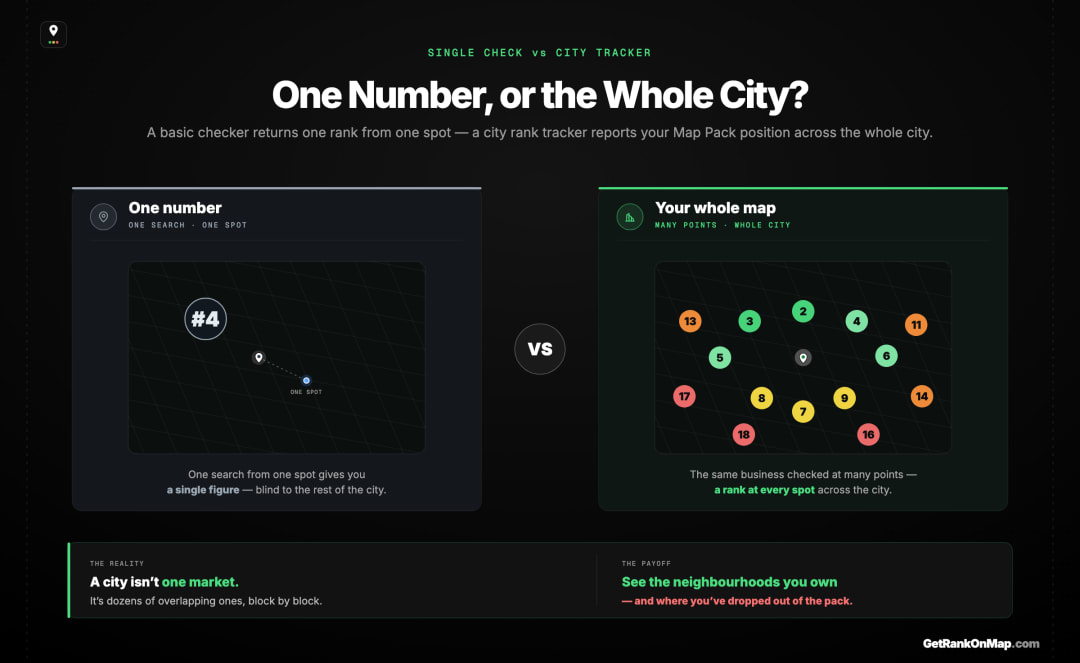
A city rank tracker reports where your business appears in the Google Maps results across an entire city — not from one location, but from many points spread across it. Instead of "you're #4," it shows you your rank in every part of town at once, so you can see the neighbourhoods you own and the ones where you've disappeared from the pack.
When someone searches for a local business — "plumber near me," "coffee shop," "dentist open now" — Google shows a Map Pack: the small map with three businesses at the top of a local result. Your position in that pack is what most people mean by "my Google Maps rank." A basic rank checker tells you that position for a single search from a single place.
A city rank tracker does something bigger. Rather than checking one spot, it checks your rank at many locations spread across the whole city, then lays the results out together so you can read your visibility as a picture of the city rather than a lone figure. The value is obvious once you see it: a city isn't one market, it's dozens of overlapping ones, and where you win the pack in one part of town has nothing to do with whether you win it in another.
That's the job — tracking your Map Pack position across the full area you draw customers from, so "how do I rank in my city?" gets an honest answer instead of a number that's true in one place and wrong in a hundred others.
Why a City Has Many Ranks, Not One
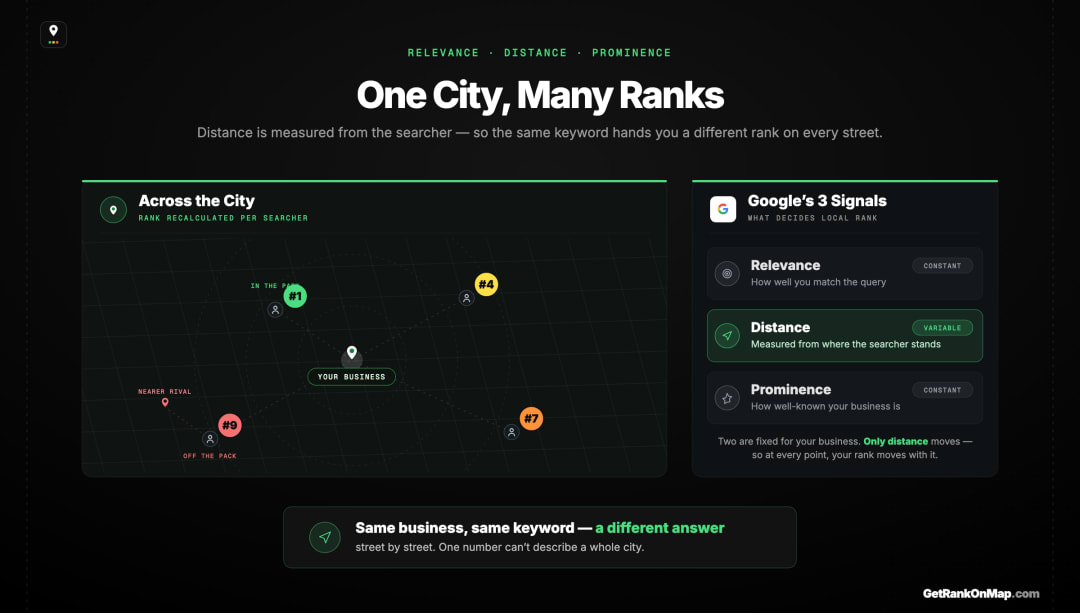
Google ranks local results on relevance, distance, and prominence — and distance is measured from wherever the searcher is standing. So your rank is recalculated for every location in the city. That's why one keyword can put you at #1 in one neighbourhood and off the pack entirely in another. A city rank tracker exists because the city is not a single point.
Google is open about how local ranking works: it weighs relevance (how well your profile matches the search), distance (how close you are to the person searching), and prominence (how established and well-reviewed your business is). Because distance is measured from the searcher's location, your ranking changes as the searcher moves — and across a city, they're moving constantly.
This is why your business ranks differently in different parts of the city. Near your premises you're close to searchers, so the distance factor works in your favour and you rank well. Out at the edge of the city, a competitor sitting nearer those searchers takes the pack, and you fall out of it — even though nothing about your business changed. Same keyword, same day, a different answer street by street.
So when you ask "what's my rank in this city?", the honest reply is: which part of the city? You don't have one rank. You have a rank for every location a customer might search from, and the useful ones are exactly the places you can't see from your own desk. This is the gap that a single rank number can't cover — it reports one spot and presents it as the whole city, which is the tracking gap most tools fall into.
Why You Can't Track a City From One Point
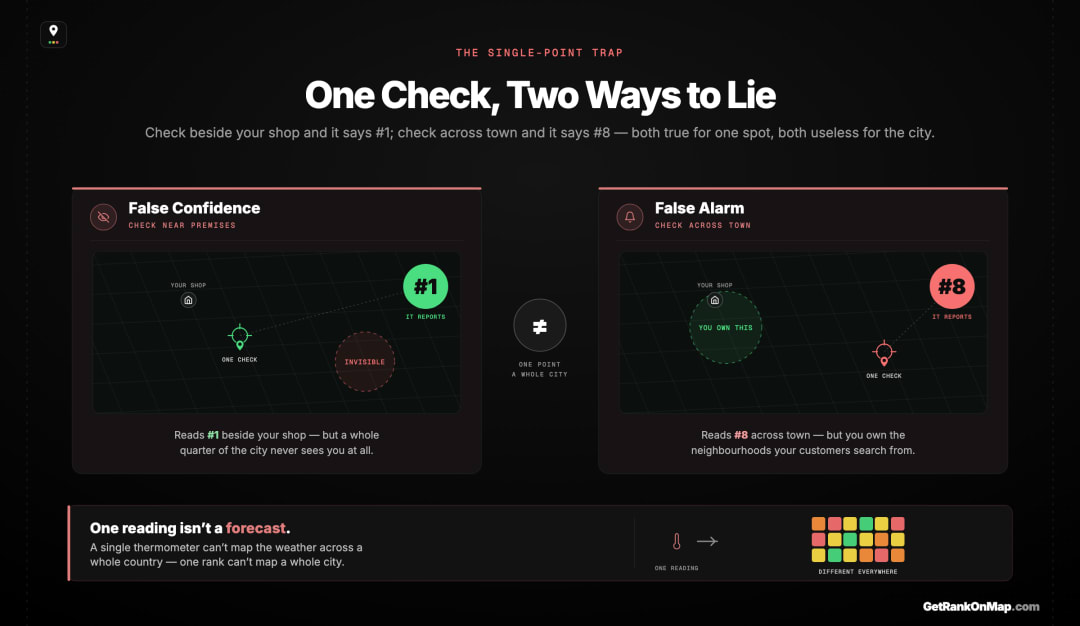
A single-point rank check runs the search from one location and reports that result as your rank. In a city, that's a single sample dressed up as the full picture. It can tell you you're #2 while you're invisible across town — or scare you with a low number measured from a neighbourhood your customers never search from. To track a city, you have to measure the city.
Most free checks — searching on your phone, an incognito window, a basic rank tool — give you a number from wherever the search was run. For a single storefront question that's fine. For tracking a city it's the wrong instrument entirely, because it samples one point and hides the variance that matters most.
Picture the failure modes. A check run from near your premises tells you you're #1 and you relax — while a whole quarter of the city, where a competitor is closer to searchers, never sees you at all. Or a check run from across town reports #8 and you panic and start changing things — when in reality you own every neighbourhood your customers actually search from. Both readings are "accurate" for their one spot and both are useless as a description of the city. A single point can't track an area for the same reason one thermometer can't map the weather across a country.
Tracking a city means doing the one thing a single-point check can't: measuring many locations, consistently, and reading them together. That's not a nicer version of the same tool — it's a different shape of measurement.
How to Track Rank by City: The Geo-Grid
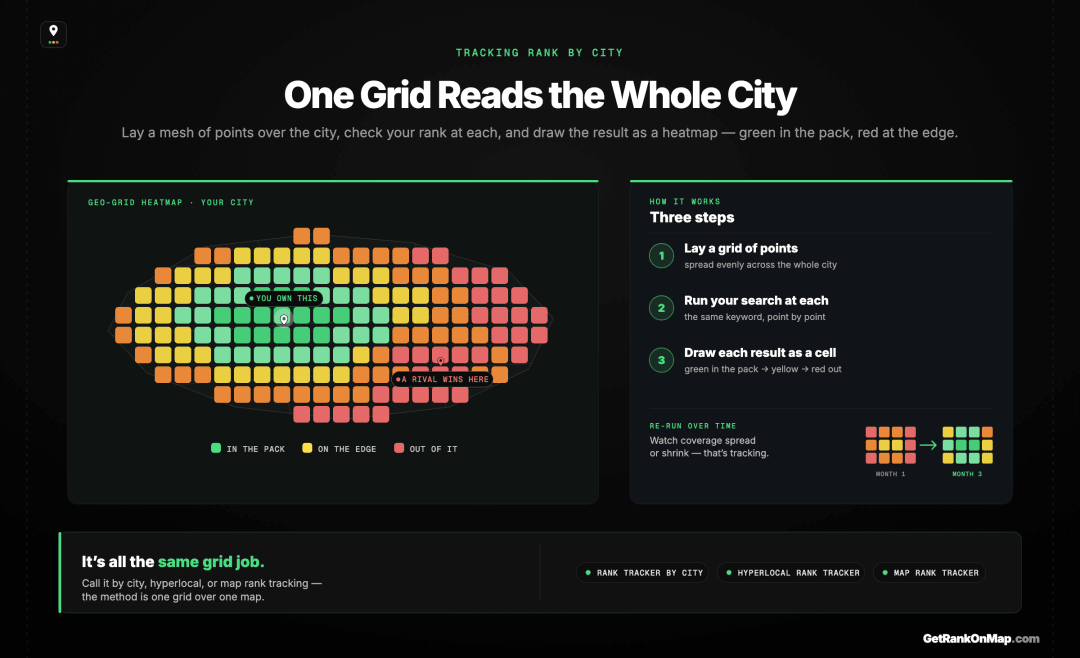
The way to track rank across a city is a geo-grid: lay a grid of points over the city, check your rank at each point, and draw the results as a colour-coded heatmap — green where you're in the pack, red where you're not. A geo-grid rank tracker turns "my rank in the city" from an impossible single number into a map you can actually read.
If your rank is different at every location, then the way to track it is to check it at many locations — and that's exactly what a geo-grid rank tracker does. It lays a grid of points across the city, runs your search at each point, and draws the results as a heatmap: green where you're winning the pack, fading through yellow, to red where you've dropped out. Here's how a geo-grid scan works.
That map is what tracking a city should mean. You can see the neighbourhoods where you own the Map Pack, the ones where a competitor has quietly taken it, and the line where your visibility fades from green to red as you move outward. Run it again next month and you can see the map change — coverage spreading or shrinking — which is what tracking, as opposed to a one-off check, is actually for.
This is also why the terms all converge on the same thing. A rank tracker by city, a hyperlocal rank tracker, a map rank tracker — they're describing one job: tracking your Google Maps visibility across an area instead of reporting a single figure. Whatever you searched to get here, the honest tool underneath is the grid, because the grid is the only shape that matches how local ranking actually works.
The Free City Rank Tracker We're Building
That grid is exactly what RankMap is built to give you: your Map Pack rank checked across a grid of points over your city and drawn as a green-to-red heatmap, so tracking your city rank means seeing your real coverage instead of one misleading number. And it's built around a genuine free tier — track your own business, run a scan, and see the map before you ever pay or hand over a card.
The honest part: RankMap isn't live yet — we're pre-launch. So this isn't a tracker you can run this minute, and we won't pretend otherwise. What this page is instead is an open invitation. If a city rank tracker that shows you where you actually stand across town — neighbourhood by neighbourhood, as a map rather than a number — is what you came here for, join the waitlist for free early access. You'll be first in when it opens, and you'll have a say in how the free tier works.
A City Is Not One Rank
A single citywide number hides the truth that no business ranks #1 everywhere.
For a tool comparison on citywide tracking, see the honest Whitespark alternative we're building.
Tracking your Google Maps rank across a city is worth doing — but only if you track the right thing. A single number, whether from a free tool or your own phone, samples one spot and presents it as the whole city, when your real visibility is different in every neighbourhood you serve. That isn't a quirk to work around; it's the distance factor working as designed, and it's why tracking a city means mapping it, not measuring one point of it.
The standard to hold any city rank tracker to is whether it shows you coverage: where customers can find you across town, and where a competitor has quietly taken the pack. That's the free city rank tracker RankMap is built to be — a green-to-red heatmap of your real Map Pack visibility across your whole city, with a genuine free tier behind it. We're not live yet, and we won't pretend we are — but when we open, you'll get to track your city rank the way it should have been tracked all along. Join the waitlist for free early access.
Start here: Local SEO Ranking Tools: The Six Jobs a Stack Has to Cover — the full guide this page sits under.
Frequently asked questions
- 01What is a city rank tracker?
- A city rank tracker checks where your business ranks in the Google Maps results across an entire city, rather than from a single location. Because your Map Pack position changes depending on where the searcher is, you don't have one rank in a city — you have a different one in each area. A city rank tracker measures many points across the city and shows them together, usually as a heatmap, so you can see the neighbourhoods where you're visible and the ones where you've dropped out of the pack.
- 02Why does my business rank differently in different parts of the city?
- Because Google factors the distance between your business and the searcher into local ranking, and that distance changes as the searcher moves around the city. Near your premises you're close to searchers and tend to rank well; further out, a competitor sitting nearer those searchers can take the Map Pack instead. Same business, same keyword — a different result street by street. That variance is exactly why a city needs a tracker that maps the whole area rather than reporting one number.
- 03What's the difference between a city rank tracker and a geo-grid rank tracker?
- They're the same tool described two ways. "City rank tracker" names what you're tracking — your rank across a city — and "geo-grid rank tracker" names how it's done: by laying a grid of points across the area, checking your rank at each, and drawing the results as a heatmap. Terms like "hyperlocal rank tracker," "rank tracker by city" and "map rank tracker" all point at the same job — measuring your Google Maps visibility across an area instead of at a single spot.
- 04Can I track my city rank for free?
- You can get a rough read for free by searching your keyword from different parts of the city — on your phone or in an incognito window — but Google personalises results by your location, account and history, so each check only shows one spot and it's tedious to repeat consistently. To track a whole city properly you need a grid-based tool that samples many points at once. RankMap is being built around a real free tier for exactly this; it isn't live yet, so [join the waitlist](https://getrankonmap.com/waitlist) for free early access.
- 05Can I use RankMap to track my city rank now?
- Not yet — RankMap is pre-launch and being built in the open, so you can't run a scan today. It's designed around a genuine free tier with no card required, so you'll be able to track your own business across your city and see the result as a heatmap for free when it opens. You can [join the waitlist](https://getrankonmap.com/waitlist) now for free early access and be first in when it's ready. We'd rather say that straight than pretend there's a live tracker here.
Explore with AI
Share this
Map your real rank across the city.
Free for the first 50 scans. No credit card.
Join the waitlist

